[!NOTE] 2025 update: I added some corrections, and added a very useful Heuristic section from the original 2020 publication.
Heuristic #
flowchart LR
  A[Do you want to access a remote service locally?] -->|Yes| B[Is it a specific port on the remote server?]
  B -->|Yes| L[Use Local Port Forwarding]
  B -->|No, need full proxy| D[Use Dynamic Forwarding]

  A -->|No| C[Do you want someone on the remote server to access a service on your machine?]
  C -->|Yes| R[Use Remote Port Forwarding]
  C -->|No| E[Do you need full proxy FROM the remote machine?]
  E -->|Yes| P[Set up reverse SOCKS proxy or VPN]
  E -->|No| G[Prepare a limonade, get outside and get some fresh air]

  classDef local fill:#cce5ff,stroke:#007bff,color:#000;
  classDef remote fill:#f8d7da,stroke:#dc3545,color:#000;
  classDef dynamic fill:#d4edda,stroke:#28a745,color:#000;
  classDef proxy fill:#d4edda,stroke:#28a745,color:#000;

  class L local;
  class R remote;
  class D dynamic;
  class P proxy;
Remote port forwarding #
SEND a port to a remote machine (Executed server-side):
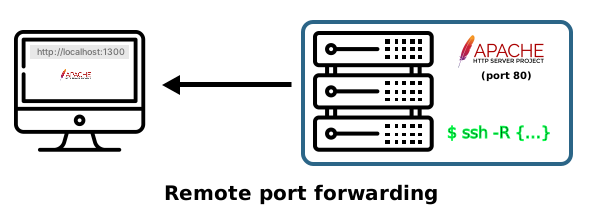
ssh -R 8080:localhost:9999 user@server
This is executed on the client, not the server, even though it affects the remote (server) side’s port binding.
Ssh [local port]:localhost:[Remote port] user@remote.server
ssh -f -R 8080:local-ftp-server:21 user@192.168.1.10 -N
(-f runs in the background after connection; -N will not run any command remotely) Kill with pkill ssh)
This command tells the remote server (server) to open port 8080 and forward any incoming traffic to the SSH client’s localhost port 9999 via the SSH tunnel.
- Examples of use:
- The server is running an http server at p. 80, only accessible locally, or it is firewalled.
- When an ftp service is allowed to be accessed only by certain hosts (Or only locally).
Local port forwarding #
GET, or "pull" a remote port (Executed client-side):
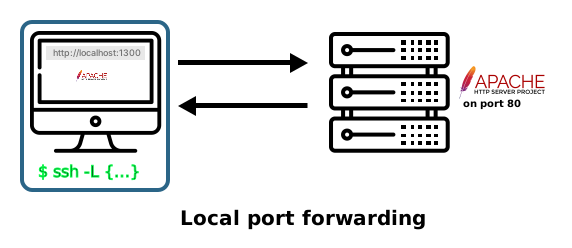
ssh -L 8080:localhost:9999 user@server
This makes the remote machine’s port 9999 accessible on the client machine at localhost:8080.
Opens an 8080 port locally, and then “binds” it to the remote server’s localhost 9999 port, through port 22 (ssh service). In short, remote port 9999 can be accessible locally at 8080.
- Another use example:
- Same functionality. The only difference is which host is executing the command.
- A port only accessible locally on another machine, for example an OpenVPN access http interface on the server, and we need to access it remotely, by “bringing” that port back for local use.
Dynamic port forwarding through socksV5 proxy #
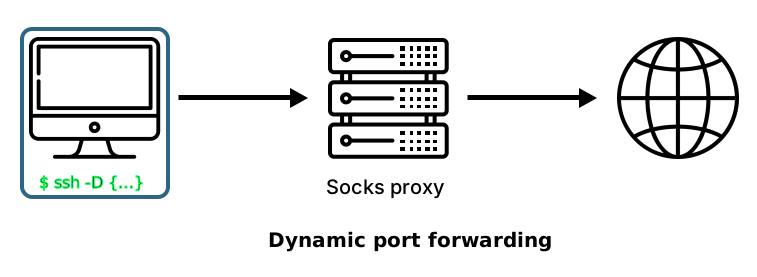
ssh -D 6666 user@ssh-server
This one has been called “The poor man’s VPN”, and it will act just as a VPN would; It will proxy the connection through localhost’s 6666 port to the remote server, tunneling all the traffic through the ssh protocol.
Use case example:
Once the connection is established, configure a browser to use a proxy, specifying localhost:6666. Then, all the traffic in that specific browser window will be tunneled through the ssh proxy.
For tunneling any specific application through our proxy: #
We can use either proxychains (Already installed in distributions like Kali) or tsocks. For installing the latter in Debian:
sudo apt-get install tsocks
Usage:
tsocks/proxychains nmap -Pn -sV -A 66.66.66.66
tsocks/proxychains firefox
tsocks/proxychains iceweasel argandov.github.io
tsocks/proxychains curl ifconfig.io
** This can, of course, be used with whatever protocol we desire, not only SSH, but also Tor, Jondonym, etc.
Port tunneling #
Corkscrew - SSH through HTTP proxy - https://web.archive.org/web/20170510154150/http://agroman.net/corkscrew/
Sslh - Application protocol multiplexer (Server-side: Allow multiple services through a single port) https://github.com/yrutschle/sslh
ssh security & hardening #
SSH SECURITY: