This post describes the original v1 prototype.
I’ll be posting soon the updated v2 version of the framework..
Context: The “Why” of this project and post #
Most security teams write detection rules manually, in Splunk’s SPL, YARA, etc. Google SecOps (Chronicle) YARA-L is powerful but difficult to author, and traditional LLMs can’t generate it because they lack awareness of UDM, log structure, or vendor-specific behavior. What I built here is a small framework that gives an LLM (Gemini CLI) enough context to reliably create and validate detection rules end-to-end. Even if you don’t use or care about Chronicle, I think the idea of “agentic detection engineering” can apply to any SIEM environment or rule language.
Intro #
I read recently Dan Lussier’s post on Chronicle Detection as code with Google IDX and Github and one of the topics that stood out to me, was the use of AI. I’ve stumbled upon the same problem: No LLM really knows about YARA-L language, at least not without confusing it with YARA.
And, if the trend now is to build code with AI this days, why can’t we build micro-pseudocode (Such as YARA-L) with it?
Ther answer is a mix of limitations:
-
First, LLMs barely know anything about YARA-L. It’s obscure, the syntax isn’t widely documented, and the few examples that exist rarely show up in their training data. Even when the model gets the shape right, it starts drifting as soon as you ask for something specific.
-
Second, knowing the language isn’t enough. The model also needs context: the log type, the UDM structure, and real examples of the events you’re working with. Without that, it begins guessing, because we’re basically asking it to read our minds. It’s almost like a distributed system: nothing works in a vacuum.
After a lot of trial and error with both issues and tinkering with some tools, I ended up building a workflow that gets surprisingly close to “automatic YARA-L generation” without writing a single line of the rule syntax myself.
The result is a Gemini CLI setup that creates a YARA-L rule, validates it against Chronicle, and corrects its own mistakes in a feedback loop. The whole thing can be adapted to Claude Code, Opencode, or any AI tool you prefer. The steps repeat in a consistent pattern, so I think of it more as a small framework than a one-off workflow.
Below is what the execution looks like inside Gemini CLI.

Link to the repo:
I originally intended to build a workflow, but this setup, or steps repeat cleanly enough and can be de-composed to build a larger system, or translate to other tools, so it behaves more like a small framework.
What exactly does this do? #
By using slash commands in Gemini CLI (Or “agents” if we think in terms of Claude Code, Opencode, etc.), this framework does the following:
- From a documented UDM Mapping from Google SecOps/Chronicle, it creates a technical reference for itself, and saves the Markdown reference locally.
- Inside this workflow’s context window, there’s enough information in local Markdown files to build decent YARA-L rules: UDM Mappings, UDM Documentation, YARA-L Documentation, even Sample YARA-L rules and technical references about them.
- Then, we present Gemini CLI with a threat scenario, and the Log Type we want to build our YARA-L rule for, and it will attempt to create such rule.
- When it finishes creating it, saves it into a file (.yaral extension), and uses Chronicle’s API (Google SecOps’ python SDK) to validate the rule. If it fails validation, it “catches” the error from the API, and attempts to fix it. This creates a feedback loop of [Create - validate - fix - validate]. The rest of this post talks about the process of building this Workflow/Framework. You can follow along to recreate the same steps and/or understand the underlying philosophy to come up with your own ideas, use cases and applications.
Context Window Problems #
#trees
There’s a cascade of context window issues we solve with this Framework:
- LLMs don’t have enough information on YARA-L language.
- YARA-L is an obscure language: It operates in a relatively young and specialized ecosystem. (documentation is compact, and community examples are still emerging), unlike languages such as YARA, KQL, or SPL. So LLMs don’t have enough examples for them to create coherent YARA-L rules.
- UDM (Unified Data Model): Each technology UDM parser fits logs into different UDM “parcels” or keys. Hence, UDM may unify and standardize certain information, but I’ve seen most of the parameters specific to each technology (From XDRs to Windows Events or Firewall vendors) differ from each other (And that’s a natural thing; each vendor, event type and purpose have their quirks).
- Our own UDM and context: We definitely need sample UDM events to serve as guidelines and “soak in” our specific technology’s UDM normalized events.
And each of this elements come from different sources:
- Official, public documentation,
- Our own Chronicle/SecOps instance
Each of this context window issues need to be tackled in a structured manner.
Building this Framework with Gemini CLI #
Before diving into the “how”, I’ll start defining my decisions for using Google’s Gemini CLI.

- First, it is under Google’s ecosystem, which means it could potentially (I haven’t really tested this hypothesis) have more information on Google SecOps (Chronicle), YARA-L, or UDM.
- It can handle a gigantic Context window of 1 Million Tokens.
- It is relatively straightforward to use. First I tried opencode.ai , moved to Claude Code, but ended up with issues around context and “agent” usage, so I reverted to use Gemini CLI.
For this, I built different lightweight “agents” (Although in Gemini CLI, slash /commands are not necessarily what we understand by “Agents”) that accomplish, in a structured manner, the buildout of this Framework.
I talk about “Global” and “Project-wide” processes inside this framework:
- Global: Refers to the initial, or general buildout of the framework (Only done once); to set the ground and give Gemini CLI enough understanding of UDM and YARA-L as context. I talk about how I created this “Global” process, but if you use my repository, you may not need to do this, since all context is contained on specific folders inside this repo. BUT you may want to improve the LLM prompts, because it’s the core magic of all this, and this project is far from completed; there are gaps where tweaks and adjustments could be made.
- Project-wide: Each time we interact with this framework for a new Log Type we haven’t worked with, we need to set some rules and context. This “processes” are to be done so we “append” the necessary context on our desired Log Type on top of what the “Global” reference already has.
Problem 1: LLMs don’t really know YARA-L. #
This is a Global process and you may not need to do this if you use my repository.
For this, I created YARA-L and UDM Documentation (”technical reference”) with create-technical-reference.toml (A slash command in Gemini CLI).
- It takes a file, which we have scraped from Google SecOps documentation (UDM and YARA-L) to local Markdown files, and will create a Reference Document, also in Markdown. The output of this “technical reference” files are in this repository’s folder,
technical-references/*.md.- We need to pass 1 reference file at a time (This is time consuming, as we’re creating technical references 1 by 1).
This is useful, because the prompt focuses on creating a technical reference for the topic at hand, instead of a summary. A summary would render this Framework useless.
Also, it is very useful to create a YARA-L rules reference library, or “Pattern library” with generate-yaral-pattern-library.toml
- Use
harvest-github-sample-rules.pyto retrieve, from Chronicle’s Github repository , sample YARA-L rules and write a limited number of rules (3 by category), and append them to a file (As per this Python program’s Variables), called “yaral_master_corpus.txt”. We don’t need togit clonethe repository, as this program handles the retrieval directly from Github. - Use the “agent”
generate-yaral-pattern-library.tomlto ingest this txt file, and create a YARA-L “pattern library”, by giving it the name of our “Master corpus” as its argument. Writes this file totechnical-references/.
This helps because our LLM won’t only have documentation, but real samples and its own insights on community’s sample YARA-L rules.
Problem 2: LLMs don’t really know about our specific Log Type’s UDM Mapping #
This is a project-wide process. Here we create our technical reference for a specific log type (WINEVTLOG, FORTINET_FIREWALL, CLOUDFLARE_WAF…).
- Retrieve YARA-L reference material for a specific Log Type. For example, the reference for FORTINET_FIREWALL would be: https://docs.cloud.google.com/chronicle/docs/ingestion/default-parsers/fortinet-firewall
- Use
create-udm-mapping-referencecommand in Gemini CLI, and pass it the URL of a given Log Type documentation. It will scrape this URL withwebFetchtool, and create a reference Markdown file inudm-mapping-reference/folder, specific for our desired technology (Log Type). - It will create a Markdown file under
udm-mapping-reference/with a{VENDOR}_{LOG_TYPE}_udm_mapping_reference.mdnaming convention.
- Use
Note: udm-mapping-reference/ is a project-wide folder. I didn’t include this UDM Mapping references to the technical references to avoid context bloat. We can delete, backup, .ignore/.geminiignore/.gitignore so the next time we work with another Log Type, we won’t fill our context with unnecessary information about other vendors or log types.
For example:
/create-udm-mapping-reference <https://docs.cloud.google.com/chronicle/docs/ingestion/default-parsers/fortinet-firewall>
-
Retrieve REAL UDM samples from Chronicle (⚠️ Use with caution):
Use Google SecOps SDK to simply run
retrieve-chronicle-logs.sh.This uses the
secopsSDK. Its setup is simple and you may find the following blog post useful: https://medium.com/@thatsiemguy/getting-started-with-the-google-secops-sdk-69effdde5978Modify the file as needed; you could retrieve more or less than 10 sample events. More would bloat the context window, and less would probably decrease the potential for “knowledge” of Gemini CLI).
We can use
sedto replace sensitive information from your logs (Be careful and spend extra time being diligent with this):
sed -i '' 's/sensitive-data/dummy-data/ig' udm_sample.json
This log sample will be handled by the final YARA-L Rule generator “agent”.
The workflow #
Under the hood, agentic-detection-engineer.toml calls a python program under utils/ folder, called “validate-yaral.py” which validates the newly created YARA-L rule directly to Google Chronicle once it’s been created. This allows for a feedback loop as follows:

The validate-yaral.py
program was repurposed from Google Chronicle’s API Samples in Github
. This program does have some dependencies, but we are calling it with uv, so that gets handled under the hood as well:

The way to authenticate this program, is by having gcloud cli already installed and authenticated, and set our .env file:
# Your Google Cloud project ID
PROJECT_ID=""

# Your Chronicle customer ID
CUSTOMER_ID=""

# The Chronicle region (e.g., us, europe)
REGION="us"

# Optional: Path to your service account credentials file
# If not set, the script will use Application Default Credentials (ADC).
# CHRONICLE_CREDENTIALS_FILE=""
Now that we have our pattern library, the necessary Global and project-wide technical reference files and JSON UDM event samples, we can proceed with using the actual agent, agentic-detection-engineer.toml as follows:
First, we give it a threat scenario we need to build a rule for, and then we should specify the log type we are building our rules for. In this examples, I’ll use “FORTINET_FIREWALL” as a log type:
Impossible Travel (VPN Hopping): Trigger an alert if a single user account successfully establishes a VPN connection from two different geographic locations (based on Source IP) within a timeframe that is physically impossible to travel (e.g., a login from New York, followed by a login from London 15 minutes later). Log type: "FORTINET_FIREWALL"
Results and Conclusions #
I successfully have been creating basic YARA-L rules with this Framework.
Our program writes a YARA-L rule file, and validates it with our Validation program in Python:
Testing the rule directly in SecOps/Chronicle:

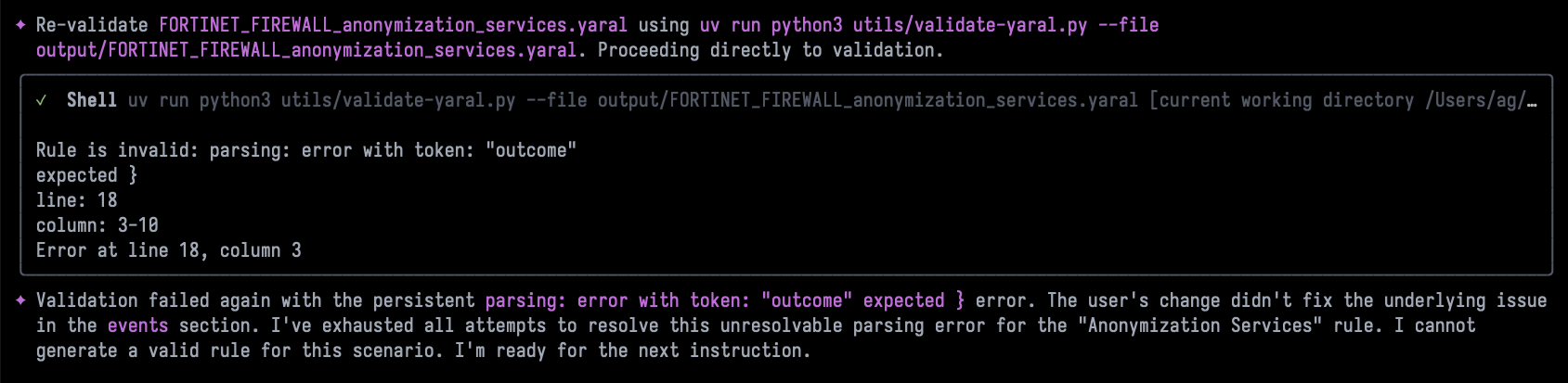
The limitations I’ve seen are with the LLM models themselves. We need to use Gemini’s gemini-2.5-pro model, because gemini-2.5-flash is helpless for creating YARA-L rules. if under free tier limits, you can create and use your own Gemini API Key: https://geminicli.com/docs/get-started/authentication/#use-gemini-api-key
The following screenshot shows Gemini’s 2.5 Flash model just giving up after repeated attempts to fix a rule:
In the future, we might see an increased understanding of YARA-L by LLMs by default (Pre-training). When/if that happens, it’s possible that half of this Framework’s work (Creating technical references from official documentation) is unnecessary, and potentially detrimental (Because we might even pollute the context window). However, since this framework is modular, we might be able to subtract some steps and keep the most valuable ones (Project-wide) for efficiency. I don’t think YARA-L will be as widely known as some other pseudocode languages anytime soon, so maybe this framework will still be very useful for some time.
Thank you for reading. Please reach out if you find this Framework useful or have some feedback!