Quick script to create a Service Principal (Enterprise App) with Global Reader / Viewer on a specified Azure Subscription
Intro: What is all this? #
This is a PoC, useful for some cases. It generates a Service Principal (Enterprise App) with Global Reader / Viewer on a specified Azure Subscription
Checklist #
- Pending: New PS script to delete everything -
cleanup.ps1 - Pending: Patch the SP with an icon.
Active Directory Requirements (Future) #
This does not come with Entra ID permissions.
script execution #
Generates a TUI that allows for Subscription selection
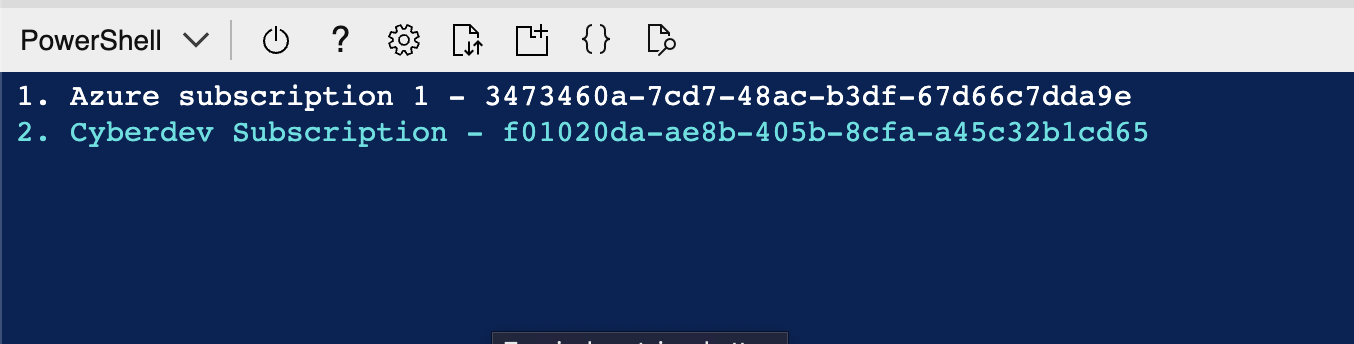
- 🪒 Full Script:
# CHANGE THIS
$APP_NAME = "APP_TEST"

function Select-AzureSubscription {
    # List all subscriptions
    $jsonOutput = az account list --all --output json | ConvertFrom-Json

    # Prepare options
    $options = @()
    foreach ($sub in $jsonOutput) {
        $options += "$($sub.name) - $($sub.id)"
    }

    $selectedIndex = 0

        # Función para desplegar en pantalla suscripciones disponibles para seleccionar:
    function Display-Menu {
        Clear-Host
        for ($i = 0; $i -lt $options.Length; $i++) {
            if ($i -eq $selectedIndex) {
                Write-Host " > $($i + 1). $($options[$i]) < " -ForegroundColor Cyan
            }
            else {
                Write-Host "   $($i + 1). $($options[$i])"
            }
        }
    }

    Display-Menu

    while ($true) {
        $keyInfo = $host.UI.RawUI.ReadKey('NoEcho,IncludeKeyDown')
        switch ($keyInfo.VirtualKeyCode) {
            38 { # Flecha arriba
                if ($selectedIndex -gt 0) { $selectedIndex-- }
            }
            40 { # Flecha abajo
                if ($selectedIndex -lt $Options.Length - 1) { $selectedIndex++ }
            }
        }
        # Capturar tecla "Enter":
        if ($keyInfo.VirtualKeyCode -eq 13 -or $keyInfo.Character -eq [char]13) {
            break
        }
        Display-Menu
    }

    # Almacena la suscripción seleccionada en una variable (Contiene el ID)
    $selectedSubscription = $options[$selectedIndex] -split ' - ' | Select-Object -Last 1
    return $selectedSubscription
}

# SELECCION DE SUSCRIPCION
$selectedSubscriptionId = Select-AzureSubscription

# Confirmación al usuario:
Write-Host "[i] You selected subscription ID: $selectedSubscriptionId"

# CREACION DE SUSCRIPCIÓN
az ad sp create-for-rbac -n $APP_NAME --role acdd72a7-3385-48ef-bd42-f606fba81ae7 --role 39bc4728-0917-49c7-9d2c-d95423bc2eb4 --scopes /subscriptions/$selectedSubscriptionId
Azure Roles #
reader ID: acdd72a7-3385-48ef-bd42-f606fba81ae7
security reader ID: 39bc4728-0917-49c7-9d2c-d95423bc2eb4
To list (generic) and list those (predefined) roles, filtered by searched names:
az role definition list --query "[].{name:name, roleType:roleType, roleName:roleName}" --output tsv | Select-String -Pattern "glob"
Execution Tests #
AppId = Client ID (AZURE_CLIENT_ID)
password = Client Password (AZURE_CLIENT_SECRET)
Output Sample:
{
  "appId": "22a13b47-DEAD-BEEF-a173-5d74ea08854a",
  "displayName": "Test-App",
  "password": "XXXXX~6V7Zgbsh1mwNyPB8u-dAqLMTdl3ElPUaoE",
  "tenant": "bad684a6-DEAD-BEEF-9bf5-1d9822565e2c"
}